3D Great Wave Shadow Box, 3D Ocean: Bringing Hokusai’s Masterpiece to Life
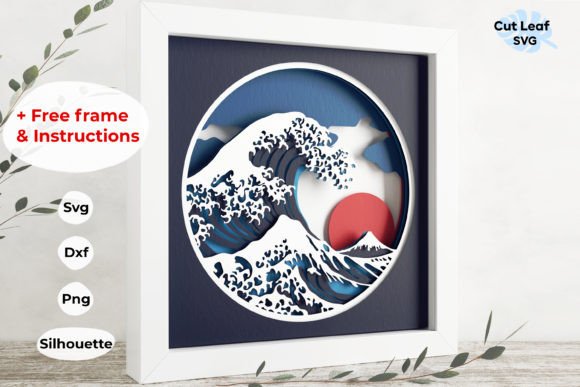
The iconic image of a towering wave about to crash, known as The Great Wave off Kanagawa, has captivated viewers for centuries. While traditionally experienced through flat prints or paintings, modern crafting enthusiasts and interior designers are finding new ways to engage with this masterpiece. By utilizing a 3D Great Wave Shadow Box, 3D Ocean design, creators can transform a two-dimensional concept into a tangible, layered art piece that adds depth and dimension to any space. This approach allows hobbyists to move beyond simple cutting and pasting, offering a sophisticated project that results in a stunning decorative item.
For many crafters, the challenge lies not just in replicating an image, but in capturing its dynamic energy. A standard print lacks the tactile presence that makes wall art engaging. The goal is to create something that interacts with light and shadow, giving the illusion of movement and volume. This is where specialized digital files come into play. By providing structured layering systems, these digital resources enable users to build a physical representation of the ocean’s power, turning a complex artistic vision into an achievable DIY project.
Understanding the Design Structure
At the core of this project is a meticulously organized design consisting of 10 distinct layers. Each layer is numbered specifically to guide the assembler through the correct order of construction. This systematic approach is crucial for achieving the desired depth effect. When assembled correctly, the overlapping layers create a parallax-like illusion, making the wave appear to rise from the background. The design is optimized for an inner frame size of 8.5 x 8.5 inches, which is a standard dimension that fits readily available frames from most home goods stores.
One of the most significant advantages of this specific file set is its scalability. While the default sizing is tailored for standard 8.5x11-inch cardstock—a material widely accessible and easy to work with—the digital files are fully scalable. This means that whether you want a small desk ornament or a large statement piece for your living room, you can adjust the dimensions without losing the integrity of the cut lines. For those working with larger formats, it is simply a matter of scaling the vector file before sending it to the cutting machine, ensuring that the proportions remain consistent regardless of the final output size.
Technical Compatibility and File Formats
To ensure that every user can bring their 3D Great Wave Shadow Box, 3D Ocean to life, the download includes a comprehensive suite of file formats compatible with various software ecosystems. This versatility removes technical barriers, allowing both beginners and advanced users to utilize their preferred tools.
- SVG Format: Included is one SVG file, which is essential for users of Cricut Design Space and Silhouette Designer Edition. This format ensures clean cuts and precise registration when using electronic cutting machines.
- DXF Files: Two DXF files are provided, catering to CNC machine operators and those using Silhouette Basic Edition. These vector formats are industry standards for precision cutting and engraving.
- Silhouette Studio File: Specifically prepared for seamless use with Silhouette Studio, this file type offers an optimized workflow for users within that specific software environment, reducing setup time and potential errors.
- EPS Format: For professionals and hobbyists using Adobe Illustrator, CorelDRAW, Inkscape, or Make The Cut, the EPS file provides high-fidelity vector data that can be edited and manipulated with ease.
- PNG Format: A photo-format PNG with a transparent background is included. This is particularly useful for digital planning, mockups, or if you prefer to hand-cut the design using scissors or craft knives.
Practical Applications and Assembly
Creating a 3D Great Wave Shadow Box, 3D Ocean is not just about the final product; it is also about the process. The inclusion of a PDF instruction manual and a detailed Layers Guide transforms this from a guesswork exercise into a guided experience. For novice crafters, having step-by-step visual aids reduces anxiety and ensures that the alignment of layers is accurate. Misalignment is the most common issue in shadow box projects, so clear instructions are invaluable.
The materials required are straightforward. Standard 8.5x11-inch cardstock is recommended because it offers enough stiffness to hold its shape while being thin enough to allow for clean cuts. Users often experiment with different colors to enhance the dramatic effect of the wave. For instance, using deep blues for the deeper layers and lighter whites or creams for the cresting foam can significantly increase the realism of the piece. The free frame mentioned in the listing further simplifies the project, as users do not need to source specialized framing equipment.
Who Is This Project For?
This project appeals to a diverse audience. Interior design enthusiasts looking for unique, handmade decor will appreciate the ability to customize the color palette to match their existing aesthetic. Educators might find value in using this project to teach principles of geometry, layering, and spatial awareness. Additionally, fans of Japanese art history may enjoy the tactile engagement with Hokusai’s work, gaining a deeper appreciation for the composition by physically constructing it.
For professional designers, the scalability and vector nature of the files offer another advantage. They can integrate this design into larger installations or combine it with other elements to create custom wall displays. The ability to edit the EPS file in Adobe Illustrator allows for modifications, such as adding text or integrating other motifs, making it a flexible resource rather than a static product.
Considerations for Success
While the files are ready to cut, success depends on attention to detail during assembly. It is recommended to use a strong adhesive that does not warp the paper, such as a fine-tip glue pen or double-sided tape. Working in a clean, well-lit area helps prevent dust from settling on the adhesive surfaces. Furthermore, taking time to align each layer carefully before applying glue will result in a more polished final appearance. If using a cutting machine, ensuring that the blade is sharp and the mat is sticky enough to hold the cardstock securely will prevent shifting during the cutting process.
Ultimately, the 3D Great Wave Shadow Box, 3D Ocean represents a fusion of traditional art and modern technology. It empowers users to take ownership of their decor, creating pieces that are not only visually striking but also personally meaningful. By providing the right tools, formats, and guidance, this resource bridges the gap between inspiration and execution, allowing anyone to capture the majestic power of the ocean in their own home.